Overview
Making this was a bit more complicated than I thought, but I have learned a lot from what I have made. A quick rundown of the current features:
- Add your own HDA into a selectable dropdown in Blender that you want to run
- Select your own Houdini version you want to run and it will automatically find the required Python files (Unfortunately, Python 3.7 and below causes issues for now)
- Files are exported, processed, and imported automatically. To process the files, Houdini is run headless using the Python command line it provides (hython.exe)
- Settings are saved in a JSON file, so the different HDA items are saved across blender sessions
Preparing the data and Running Houdini
Using Python, Houdini can be run without opening its GUI, making it faster and easier to use when you only need to run a single HDA to do one specific thing. I plan to add parameter support in the future, as it only runs the HDA's default values.
def execute(self, context):
  files = context.scene.files_props

  # Get the index of the currently selected file using the ids contained in the dropdown menu
  index = [x['id'] for x in data_for_enum].index(files.selected_file_enum)

  # Create a temporary directory
  with TemporaryDirectory() as tmp_d:
      temp_file_paths = ExportTempFiles(tmp_d, files.process_individually_toggle)
      houdini_settings = context.scene.settings_props

      # Format data into a JSON dictionary
      # Gets the required python files to run Hython and the paths of selected meshes
      data ={
          "houdini_path" : houdini_settings.houdini_path,
          "houdini_python_lib_path" : houdini_settings.houdini_python_lib_path,
          "hda_path" : data_for_enum[index]['path'],
          "mesh_path" : temp_file_paths
      }
      data_json = json.dumps(data, indent= 2)

      python_exe = houdini_settings.python_exe_path
      # Run python script using the selected python.exe (hython.exe) and use the formated data as an argument for the HoudiniUtils script to run Houdini
      houdiniProcess = subprocess.run([python_exe, 'HoudiniUtils.py', data_json], capture_output=True, text=True)
      print(houdiniProcess.stdout)
      print(houdiniProcess.stderr)

      #import the files back to blender
      for file in temp_file_paths:
          bpy.ops.wm.fbx_import(filepath=file)

  return {'FINISHED'}
How the code works:
- An index is obtained from the dropdown and used to get the coresponding HDA of the selected item
- A temporary directory is created using the tempfile library and the selected meshes are exported into that directory
- Required data to run the Houdini process is formated in a JSON dictionary and converted into a string. This is done to make processing arguments easier compared to giving an array. The data items are: the selected Houdini version path, its python library, selected HDA path, and the exported meshes paths
- Houdini is executed in the background through HoudiniUtils.py (contains the functions Houdini will run) with the selected hython.exe. The data previously prepared is used as an argument
- Houdini processes the mesh and replaces the meshes in the temporary folder
- After the process is done, blender reimports the meshes that has been processed by Houdini
Running Houdini Python with HoudiniUtils
HoudinUtils.py is a script made to handle Houdini with Python, using the data obtained from blender to run the HDA and exports it.
def ProcessMeshWithHDA(string_data):
    data = json.loads(string_data)

    #imports the hou module using the paths provided
    hou = enableHouModule(houdini_path = data['houdini_path'], python_lib_path = data['houdini_python_lib_path'])

    # Install the selected HDA and gets its label
    hda_path = data['hda_path']
    hou.hda.installFile(hda_path)
    definition = hou.hda.definitionsInFile(hda_path)
    hda_label = definition[0].nodeTypeName()

    for mesh in data['mesh_path']:
        obj = hou.node('/obj')
        geo = obj.createNode('geo')

        # Import the file
        file = geo.createNode('file')
        file.parm('file').set(mesh)

        # Connect file to HDA
        hda = geo.createNode(hda_label)
        hda.setInput(0, file)

        # Handle export
        export = geo.createNode('rop_fbx')
        export.setInput(0, hda)
        export.parm('sopoutput').set(mesh)
        export.parm('convertunits').set(True)
        export.parm('execute').pressButton()
How the code works:
- The string data is converted back into a json dictionary
- The hou module is imported using houdini and its python library path
- The HDA is imported into the current houdini session
- A for loop processes each of the mesh paths, where it imports the mesh, run it through the HDA, then exports it
- After everything is done, blender imports the mesh
Settings File
A settings.json file is created and used to save and load previously created HDA items in blender. Everytime change is made, this file is updated. Example from the video above.
{
  "houdini_path": "C:\\Program Files\\Side Effects Software\\Houdini 20.0.896\\",
  "houdini_python_lib_path": "C:\\Program Files\\Side Effects Software\\Houdini 20.0.896\\houdini\\python3.9libs",
  "python_exe_path": "C:\\Program Files\\Side Effects Software\\Houdini 20.0.896\\bin\\hython.exe",
  "scripts_and_digital_assets": [
    {
      "id": "Points to Cube",
      "name": "Points to Cube",
      "description": "Points to Cube",
      "path": "C:\\Lazy Tools\\Blender\\BlenderToHoudini\\sop_points_to_cube.hdalc"
    },
    {
      "id": "Root On Object",
      "name": "Root On Object",
      "description": "Grows roots from the base of an object to the top",
      "path": "C:\\Lazy Tools\\Blender\\HDA_Test\\sop_RootOnObject_alt.hdalc"
    },
    {
      "id": "Random Scatter",
      "name": "Random Scatter",
      "description": "Scatters random objects on selected mesh",
      "path": "C:\\Lazy Tools\\Blender\\HDA_Test\\sop_ScatterRandomObjects.hdalc"
    }
  ]
}
Blender to Houdini to Blender (WIP)
One problem that came up when running Houdini completely headless is changing the parameters. One solution is to load the HDA parameters inside of Blender and pass those paramaters into the HDA. Another solution is to open the meshes inside in houdini and have a shelf tool that exports all of those meshes, then tells Blender to import them.
I chose the latter because it would be slightly easier and allows further addition to the node tree if needed.
To allow communication between Blender and Houdini, I had to use sockets to create a server and client communication between the two applications. To help me create a good base for the system and learn more about sockets, I used this website guide: https://realpython.com/python-sockets. I found some people in forums reccomending this page to learn sockets and it was exactly what I needed.
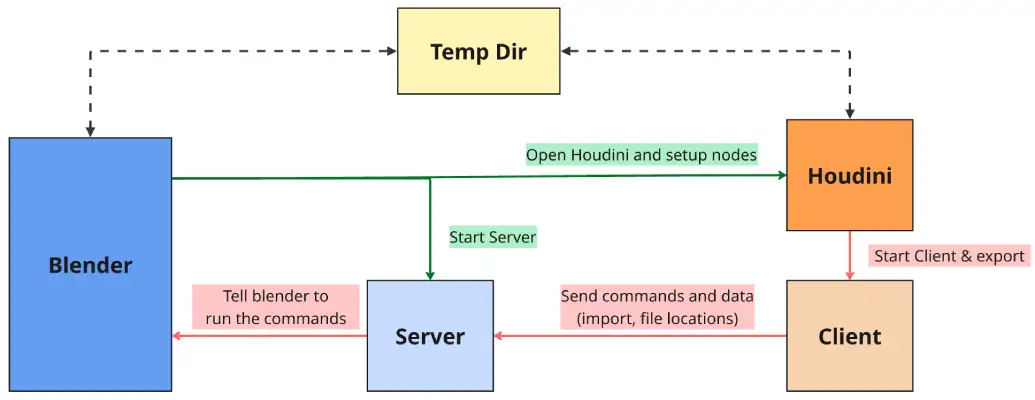
The overall flow is like this:
- The "Open in Houdini" button exports all of the mesh into a temporary directory and opens Houdini together with a python script to setup the required nodes
- On the side, a server is started to receive messages from a Houdini client. This server runs on a different thread to stop it from blocking Blender's processes
- Houdini loads a custom package that contains shelf tools and python scripts to run the client code
- When the "Export All to Blender" shelf tool is pressed, all meshes are exported and a client is created to send a message to the Blender server that contains the action (import) and data (exported file locations)
- The Blender server receives the message and runs the command that it receives, which is importing all the meshes with the given data